Upcoming Events!
- Upcoming Wi-Co Events
- Be sure to check https://wi-co.org/
Don’t forget to check out our new document library with free valuable downloadable content!
- Miliwatt to dBm conversion table
- Wireless IoT reference charts for types and security
- Best practice white papers to help you stay on your game
Why specialized industrial wireless clients?
- Wireless clients are the bridge between the past and the present. The vast majority of industrial devices, PLCs, drives, sensors, HMIs, and controllers, are engineered for deterministic performance and long service life, not wireless connectivity. They ship with Ethernet ports, not radios. Industrial wireless client radios exist specifically to give these wired-by-design devices a wireless presence without requiring any changes to the device itself or the control program running inside it.
- Freedom of movement changes what’s possible on the plant floor. Conveyors, AGVs, robotic arms, transfer carts, and overhead cranes all move, and running Ethernet cable to something that moves is either impractical, expensive, or eventually guaranteed to fail. Wireless clients eliminate the cable entirely, giving mobile and rotating machinery reliable network connectivity that moves with the equipment.
- Wireless clients enable the Industrial Internet of Things (IIoT) without a forklift upgrade. Adding wireless clients to existing field devices means real-time data, cycle counts, temperatures, fault codes, production rates, can flow to SCADA systems, historians, and cloud analytics platforms without replacing equipment that still has years of useful life left. The radio does the heavy lifting; the device just keeps doing its job.
- In hazardous, remote, or physically inaccessible locations, wireless isn’t a convenience, it’s the only option. Tank farms, offshore platforms, grain elevators, and mining operations all present environments where pulling cable is either dangerous, cost-prohibitive, or physically impossible. Industrial-grade wireless clients, rated for wide temperature ranges, vibration, and hazardous area classifications, make instrumentation and control possible in places where no wire will ever go.
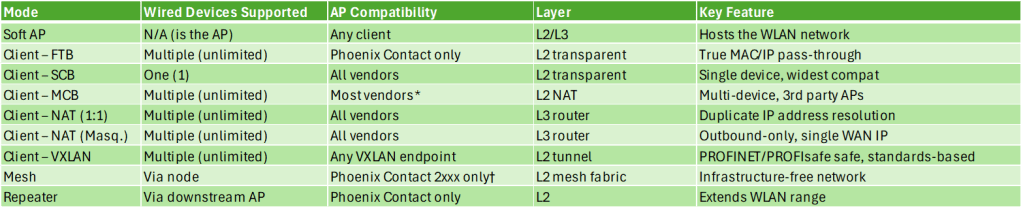
Phoenix Contact 1021 Industrial Wireless Client Modes:
- In FTB mode, the client radio acts as a wireless bridge allowing multiple wired end devices to communicate transparently via Layer 2 or Layer 3 communication. FTB is used when wirelessly connecting to a Phoenix Contact WLAN module configured as an access point.
- In SCB mode, data is transmitted transparently on Layer 2. Only the device whose MAC address is entered for the radio can be accessed via WLAN, and only one wired device may be connected.
- In MCB mode, the Phoenix radio uses a Layer 2 NAT function when communicating to the access point, allowing multiple wired clients to communicate over the wireless connection. All wired clients behind the device are transmitted with the MAC address of the radio, the number of wired clients is unlimited.
- Client (NAT) breaks into two sub-modes:
- 1:1 NAT, where each LAN device is allocated an IP address from the higher-level network so it can be reached from the WAN
- IP masquerading, where the NAT device acts as a proxy and all LAN devices communicate externally using only the NAT device’s own WAN address — with TCP/UDP ports used to differentiate between devices. This is useful when you have duplicate IP address spaces across identical machine cells.
- Client (VXLAN), the fully transparent bridge and VxLAN (Virtual Extensible LAN) enable transparent PROFINET and PROFIsafe communication, which is critical in automation networks. This mode is documented in relation to the WLAN 1000 client family pairing with the new WLAN 2300 access points. It’s standards-based (RFC 7348), so it isn’t locked to Phoenix Contact infrastructure the way FTB is.
What is VxLAN?
- VxLAN wraps a complete Ethernet frame inside a regular IP/UDP packet so it can travel anywhere IP travels, then unwraps it at the other end, making two distant devices believe they’re sitting on the same local wire.
Why it matters for industrial wireless specifically:
- Protocols like PROFINET and PROFIsafe are “Layer 2 snobs”, they expect to see the real MAC address of the device they’re talking to, unmodified, end to end. Modes like MCB swap out MAC addresses behind the scenes, which breaks PROFINET. VxLAN mode preserves everything inside the tunnel, the receiving device opens it up and sees the exact original Ethernet frame, MAC address intact, as if the wireless hop never happened.
VXLAN vs FTB — what’s the difference?
Both achieve true Layer 2 transparency, but:
- FTB is Phoenix Contact proprietary and requires a Phoenix Contact AP on the infrastructure side
- VXLAN is standards-based (IETF RFC 7348) and works with any AP or controller that supports VXLAN termination, including the Phoenix Contact WLAN 2300 series access points
ProSoft Technologies RLX2-IHNF-A, Four Operational Modes Explained
- Master – The Master is the anchor and root of the entire RLX2 wireless network. Every other radio in the network, Repeaters, Bridging Clients, and Clients, ultimately connects back to the Master, either directly or through a chain of Repeaters. There is typically one Master per wireless network, though multiple Masters can coexist without special programming for redundancy.
- Repeater – The Repeater is the workhorse of the ProSoft network. It connects wirelessly to a Master (or another Repeater), extends the wireless coverage area, and simultaneously allows additional radios to connect through it. It is also the factory default shipping configuration, every RLX2 radio ships as a Repeater out of the box, ready to link to whatever Master it finds.
- Bridging Client – Bridging Client is the mode used when you want to connect multiple wired Ethernet devices through a single RLX2 radio to a third-party 802.11 access point, not a ProSoft Master. Think of it as the “multi-device adapter” for foreign Wi-Fi infrastructure.
- Bridging Client mode is specifically designed for environments where the access point is not a ProSoft radio. It uses standard 802.11 association and works with the AP’s existing SSID and security settings. Note that some third-party AP controllers (notably Cisco WLC systems) may require additional configuration to allow multiple MAC addresses over a single wireless association — the same consideration that applies to MCB mode in other industrial radio families.
- Client – Client mode is the simplest connection mode in the RLX2 lineup — one radio, one wired device, one wireless connection to a third-party access point. It’s the “single device adapter” for foreign Wi-Fi infrastructure.
- The radio can be configured in two sub-modes:
- Auto, the radio automatically detects the MAC address of whatever is plugged into its Ethernet port and uses it for the wireless association. Easy, fast, and appropriate for most single-device setups
- Specify, the operator manually enters the MAC address of the target device. The manual notes this is only necessary for devices that do not send unsolicited Ethernet packets — meaning the device is passive and doesn’t announce itself. ProSoft’s guidance is to try Auto first and only use Specify if Auto doesn’t work
- The radio can be configured in two sub-modes:

As you probably know, Scott and Jeremy work with different application types for the most part. Jeremy primarily touches mobility applications with mixed/client and infrastructure.
Jeremy generally works with whatever infrastructure the end customer has for enterprise and occasionally gets to build both ends of the WLAN.
Jeremy’s team used to use the Aruba501, which had a lot going for it.
RSSI log, simple interface, remote packet capture, exportable logs.. <- You could do a lot to troubleshoot these devices.
I was just on a call with a vendor and it is both nice and disheartening to hear that telemetry and data can be hidden because the “casual end customer” will generate more nonsense complaints if the nerd knobs are exposed. Sometimes you have to get into the weeds, limiting MCS, NAT/IP Masquerading to work around passive client issues.
What is a Passive Client?
A passive client is a device that does not actively participate in normal network communication unless it is polled or queried.
In practical terms, a passive client:
- Does not initiate traffic on its own
- May not send ARP, DHCP renewals, or periodic data
- Only responds when another device communicates with it
Examples in industrial environments
- PLCs waiting for control traffic
- I/O devices that only respond to cyclic polling
- Sensors that do not generate unsolicited traffic
NAT, specifically IP masquerading, helps by making multiple downstream devices appear as a single active client to the wireless network. The radio handles all communication on behalf of the devices behind it, so the infrastructure only needs to track one MAC and IP address. This keeps passive devices reachable even if they never transmit, but the tradeoff is that Layer 2 transparency is lost, which can break protocols that rely on seeing the original MAC addresses.
So this is one of the main reasons we lean on the Siemens hardware.
Siemens
Siemens SCALANCE typical models:
W734 – WiFi 4 and WUM763/766
The WiFi4 stuff is well established and has tons of features.
- Dynamic antenna selection
- NAT/IP Masquerading
- Remote capture on WLAN interface
- Available APs <- helps identify interferers
- Signal Recorder Piecewise site survey, lots of KPIs and if you have Siemens infrastructure you can get both sides of the conversation.
- Detailed Logging
- Config Plugs
- iPCF
- Force Roam on IP Down
Most of this is still present in the WiFi6 hardware.
PoE capability is not present in the WUM763.
Siemens cabinet based models are IP30
The hardened units are IP65, and typically use some variation of M12 connector. D-coded or X-coded 8 pin.
1. Transparent Bridge (Default / Standard Mode)
- True Layer 2 bridge
- Passes all MAC addresses unchanged
- Supports:
- PROFINET
- PROFIsafe
- Multiple devices behind the client are fully visible to the network
This is the primary and most important mode for all of these clients.
2. Layer 2 Tunnel Mode (Used with IPCF)
- Required when running IPCF (deterministic wireless)
- Encapsulates Ethernet frames for controlled delivery
- Maintains full Layer 2 transparency
- Used specifically for:
- Real-time industrial communication
- Deterministic cyclic traffic
Siemens explicitly calls out using “Layer 2 Tunnel” MAC mode with IPCF
3. Standard Wi-Fi (DCF) vs IPCF Operation
This is a major behavioral “mode” difference:
DCF (Default Wi-Fi)
- Standard contention-based Wi-Fi
- Works with any infrastructure
- Non-deterministic
IPCF Mode
- Scheduled medium access (deterministic)
- AP controls airtime
- Used for:
- Motion control
- Real-time automation
Important:
- IPCF and standard Wi-Fi cannot be mixed in the same cell
Aunex
Aunex wireless clients are designed to be flexible and infrastructure-agnostic. They behave more like traditional Wi-Fi clients with options for bridging or NAT, making them easy to integrate into mixed networks. The tradeoff is that they rely on standard Wi-Fi behavior, so they don’t provide the same level of deterministic performance or deep diagnostics that more specialized industrial platforms offer.
They have 6E Clients.
Core Design Approach
MODAS clients follow a standard 802.11 client model and are designed to work with a wide range of third-party access points and controllers. They support:
- Single-device client operation
- Multi-device bridging
- Layer 3/NAT-based connectivity
The focus is on adaptability rather than tightly controlled, deterministic wireless behavior.
Networking Behavior
Layer 2 Bridging
- Can pass Ethernet frames between wired devices and the WLAN
- May support multiple MAC addresses depending on configuration and infrastructure
- Works best in networks that allow multi-MAC clients
NAT / Routing Modes
- Supports Layer 3 NAT / IP masquerading
- Useful for:
- Handling duplicate IP address spaces
- Reducing MAC scaling challenges on controllers
- Simplifying machine-level network integration
MAC Handling
- Can operate as:
- Transparent bridge (when supported)
- Single visible client using NAT
Wireless Capabilities
- Operates using standard Wi-Fi (DCF)
- Supports common enterprise features:
- WPA2/WPA3
- Roaming (model dependent)
- No deterministic scheduling mechanism like IPCF
Legacy Interface Flexibility (Key Differentiator)
One area where MODAS clients stand out is support for legacy industrial interfaces, including:
- RS-232 / RS-485 serial connectivity
- Serial-to-IP conversion (serial tunneling)
- Ability to transport legacy protocols over Wi-Fi
Why this matters
- Many industrial systems still rely on serial communications
- MODAS devices can act as a bridge between legacy serial equipment and modern IP networks
- Enables:
- Retrofit of older machines without replacing hardware
- Wireless connectivity for devices that were never designed for Ethernet
Typical behavior
- Serial data is encapsulated into IP packets
- Transported over Wi-Fi
- Reconstructed at the receiving end
This allows legacy devices to function across a wireless link as if they were locally connected.
Diagnostics and Management
- Provides standard industrial diagnostics:
- RSSI / signal strength
- Link status
- Throughput and error counters
- Typically lacks deep RF time-series logging found in more specialized platforms
If you would like to connect with Scott or learn more about his employer, Global Process Automation (GPA), then check the following:
Scott McNeil – https://www.linkedin.com/in/americanmcneil/
GPA – https://www.global-business.net/
If you would like to connect with Jeremy or learn more about his employer, Prism Systems Inc, then check the following:
Jeremy Baker – https://www.linkedin.com/in/jeremyabaker/
Prism Systems Inc – https://www.prismsystems.com/
 The Industrial Wi-Fi Shop